We cover packaging and delivery costs for orders over CHF 50.–.
Personal customer support
We answer your questions personally – no automated chatbots.
30-day return policy
You receive a 30-day return or exchange guarantee.
Swiss data platform
Your data is stored securely and reliably in Switzerland.
How it works
Ready in 3 simple steps
1
Choose and buy your product
Select the right product, colour and variant.
2
Scan and activate the QR code
After receiving it, scan the QR code and activate your digital DynaTag profile.
3
Manage your data in the WebApp
Configure contact and emergency data and update it anytime.
Digital Emergency Pass with QR Code – SOS Emergency Card with RFID Protection
CHF 23.03
Free shipping from CHF 50.–Shipping from Swiss warehouseOne-time paymentNo subscriptionNo app required
Close
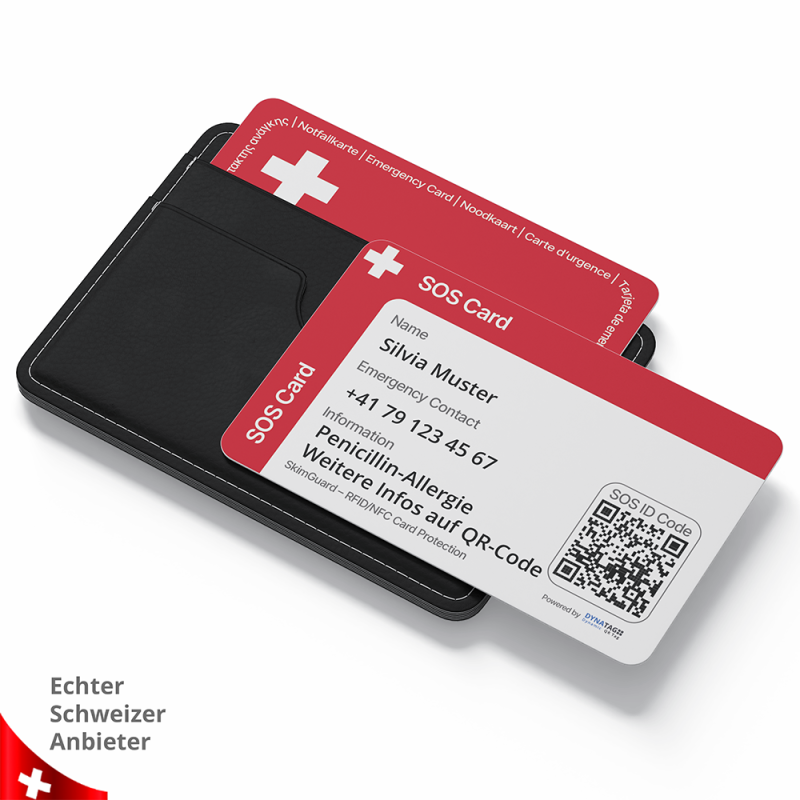
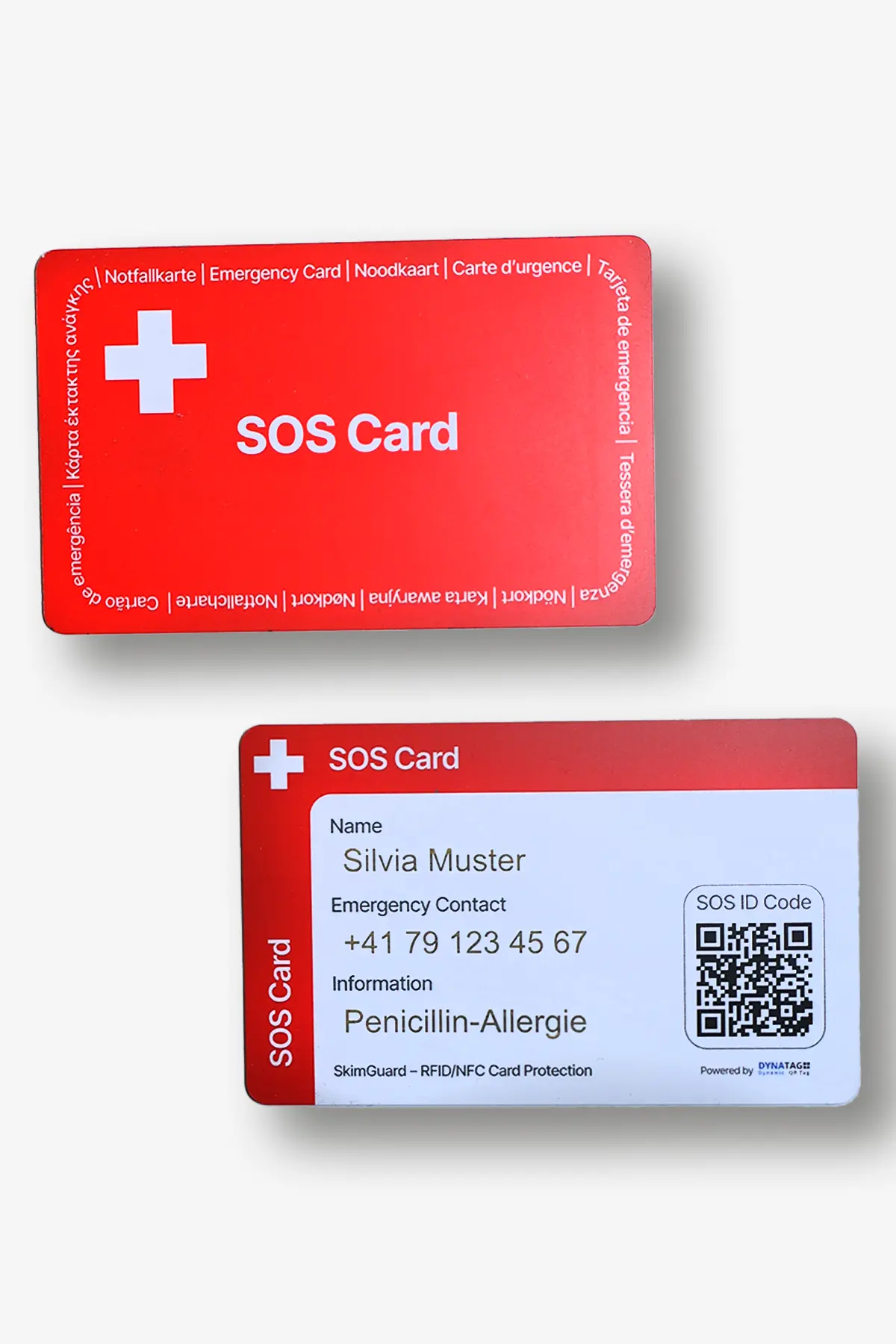
SOS emergency card in credit card format with a personal QR code for quick access to emergency contacts, health data and personal SOS information. The card fits in any wallet and can be scanned directly with Android and Apple smartphones. It can also be used as an RFID and SkimGuard protection card for bank and credit cards. Simply carry it with you, scan it in an emergency and access important information – no app required.
Quick access in an emergency: Scan the QR code with a smartphone and view authorised SOS information directly in the browser.
Emergency contacts & health data: Securely store contacts, allergies, medications, medical conditions and important personal information.
Suitable for many situations: Ideal for seniors, children, travellers, athletes and people with health risks.
RFID and SkimGuard protection: Provides additional protection for bank and credit cards in your wallet.
Swiss data platform with no tracking: Securely manage and update your data at any time. No permanent location tracking, no app and no monthly fees.
More security in one card. Medical emergency information, fast contact options and RFID protection – conveniently combined in a practical credit card format.
Product customization
Don't forget to save your customization to be able to add to cart
SOS emergency card in credit-card format with RFID protection
The SOS emergency card is a digital medical emergency ID in a practical credit-card format. It helps first responders, relatives and medical professionals quickly find important information when the person concerned is unable to speak or act.
The individual QR code displays approved emergency contacts, health information and personal SOS instructions directly in a smartphone browser. Essential information can also be written directly on the card.
The integrated SkimGuard shielding function adds passive RFID protection for contactless bank and credit cards carried in the same wallet.
Medical emergency ID in a credit-card format
Individual QR code scannable with any smartphone
Immediate access to emergency contacts and health information
Essential information can be written directly on the card
Passive RFID and SkimGuard shielding function
No app, battery or charging required
Emergency information
Contacts, personal details, a profile photo and important SOS instructions can be stored digitally and updated at any time.
Health information
Allergies, medication, medical conditions, vaccinations and medical instructions are quickly available in an emergency.
Location & contact
The person scanning the code can contact designated people directly and voluntarily share their current location if needed.
Swiss data platform
Approved information is stored and managed securely on the DynaTag platform in Switzerland.
Who is the SOS emergency card suitable for?
The card is suitable for anyone who wants to keep important emergency information readily available in their wallet – in everyday life, while travelling, during sport or in care situations.
Older people & people living alone
Keep emergency contacts, medication and important instructions readily available.
People with medical conditions
Helpful for diabetes, allergies, cardiovascular conditions, epilepsy or long-term medication.
Sportspeople & travellers
Support in the event of accidents, injuries or medical emergencies away from home.
Children & people requiring assistance
For school trips, care situations, dementia, disorientation or additional support needs.
What information can be stored?
You decide which information should be visible in an emergency.
Emergency contacts with telephone numbers
Name, personal details and profile photo
Allergies, medication and dosages
Medical conditions, previous illnesses and vaccination information
Important instructions for first responders and emergency services
Photos and messages via the integrated pinboard
Emergency card and card protection combined
The SOS emergency card combines digital emergency information with a passive SkimGuard shielding function for everyday use.
QR code and RFID shielding function in one card
Additional protection for contactless bank and credit cards
Suitable for a wallet, card holder or ID sleeve
No battery or charging required
Essential information can be written directly on the card
Digital SOS emergency card compared
Comparison with basic paper or plastic emergency cards.
Feature
SOS emergency card QR code + SkimGuard
Basic emergency card completed manually
Emergency contacts
Managed online
Limited space
Health information
Extensive information available
Only a few lines of text
Update information
Online at any time
A new card or handwritten correction is required
Voluntary location sharing
Available
Not available
RFID/SkimGuard shielding
Integrated
Usually not included
App required
No
No
Data platform
Switzerland
Not available
No app installation
DynaTag WebApp – directly in your browser
Scanning the QR code opens the DynaTag WebApp directly in the smartphone browser. No additional app needs to be installed.
Approved emergency contacts, health information, personal details and important SOS instructions are presented clearly on mobile devices.
All content can be updated at any time through the personal user account. The person providing assistance needs neither a user account nor an additional app.
SOS emergency wristband | SOS emergency clip | SOS key tag | SOS luggage tagImportant: An active internet connection is required to access digital emergency information and contact details. The SOS emergency card has no battery, does not require charging and works without an app. No continuous location tracking takes place. A location is only shared when the person scanning the code actively uses this function and gives their consent. For the SkimGuard shielding function, place the card in the wallet as close as possible to the bank or credit cards you wish to protect.
Application and Accessories
Use, care & replacement card
Instructions & help
The online instructions and frequently asked questions about the SOS emergency card are available directly from the main menu of the DynaTag WebApp.
There you will find information about activation and data management, emergency contacts, voluntary location sharing by the person providing assistance and the digital pinboard.
Activate your SOS emergency card and keep the most important information up to date.
Step 1
Activate
Scan the QR code, open the WebApp and connect the card to your personal user account.
Step 2
Add information
Enter emergency contacts, health information, a profile photo and important SOS instructions.
Step 3
Carry the card
Keep the card easy to find and quickly accessible in your wallet, card holder or an ID sleeve.
Step 4
Keep it up to date
Regularly review and update telephone numbers, medication, allergies and important instructions.
Open the WebApp more quickly
Save your DynaTag WebApp directly on your smartphone or tablet. This gives you quicker access when you need to update your emergency information.
Scan the QR code once
Open the WebApp in your browser
Add it to the Home Screen
Direct access similar to an app
Android, iPhone & iPad
On Android, use the browser menu. On iPhone and iPad, select the share icon followed by “Add to Home Screen”.
No app installation required
No need to search or scan again
Quick access to your user account
Update information conveniently at any time
Ready to hand every day
Using the card correctly
Keep the SOS emergency card in your wallet or an ID sleeve so that it is easy to find and the QR code is quickly accessible. For the best possible SkimGuard shielding effect, place it as close as possible to the bank or credit cards you wish to protect.
Carry it in a wallet, card holder or ID sleeve
Write essential information directly on the card
Keep the QR code accessible and legible
Place it close to bank or credit cards for SkimGuard shielding
Cleaning and care
Protect the QR code and card surface from scratches, bending and heavy abrasion. If necessary, clean the card with a soft, slightly damp cloth.
Avoid aggressive cleaning agents, solvents and prolonged contact with chemical substances.
Do not bend, cut or wash the card in a washing machine.
Replacement card after loss or damage
If the card is damaged or lost, or if the QR code can no longer be scanned reliably, you can ask customer service for a replacement card with the same QR code.
The replacement card can be linked to your existing digital SOS page, so your stored emergency information remains available.
An active internet connection is required to access digital emergency information. The card contains no battery or electronics and does not need to be charged.
Regularly check that the QR code remains legible
Keep telephone numbers and health information up to date
Carry the card where it is easy to find and quickly accessible
No app installation required
Note: For the best possible SkimGuard shielding effect, place the SOS emergency card in your wallet as close as possible to the bank or credit cards you wish to protect. SkimGuard is a passive shielding aid and cannot guarantee protection against every form of card misuse.
Videos
We ship your order directly from Switzerland with reliable delivery. Shipping costs are automatically calculated during checkout.
🇨🇭
Switzerland & Liechtenstein
Shipping via Swiss Post (A-Post or B-Post). Free delivery for orders over CHF 50.
🚚
Delivery Time
In-stock items are usually processed within 1–2 business days after payment is received.
🌍
International Shipping
International deliveries are handled via Swiss Post. Customs duties, VAT and handling fees are paid by the recipient.
Shipping Costs
B-Post Economy CHF 5.00 under CHF 50A-Post Premium CHF 9.00 under CHF 50Free Shipping From CHF 50
Processing & Delivery
In stock: Processing within 1–2 business days after payment. Estimated delivery: 2–5 business days (Mon–Fri).
Out of Stock
Out-of-stock items are reordered immediately after purchase. Delivery is usually completed within 30 days.
Order Cut-off Time
Orders placed before 12:00 (CET / Zurich) and paid are usually processed the same business day.
Tracking
For A-Post+ shipments, you will receive a tracking number with your shipping confirmation to track your parcel via Swiss Post.
Address Changes
Please ensure your shipping address is correct during checkout. Changes are only possible before the order has been processed or shipped.
Damaged Parcels
If your parcel arrives visibly damaged, report it immediately upon delivery and contact us within 48 hours with photos.
International Deliveries
For deliveries outside Switzerland and Liechtenstein, additional charges such as customs duties, VAT and handling fees may apply. These costs must be paid directly to the shipping provider.
FAQ about the SOS emergency card with QR code and RFID protection
Answers about the digital SOS function, data security, SkimGuard shielding, use and replacement cards.
What is the SOS emergency card with QR code?
The SOS emergency card is a digital medical emergency ID in a practical credit card format. It fits in any wallet and is quickly accessible in everyday life, while travelling or during sports.
After the individual QR code is scanned, your personal DynaTag SOS WebApp opens. Your approved emergency contacts, health information and personal SOS instructions can then be viewed directly in the smartphone browser.
What information can be accessed via the QR code?
You decide which information is visible after the QR code is scanned. Depending on your settings, the following information may be displayed:
Emergency contacts with telephone numbers
Personal details and profile photo
Allergies, intolerances and medication
Dosages, illnesses and pre-existing conditions
Important instructions for first responders and emergency services
Location voluntarily shared by the person scanning the code
Digital pinboard for photos and text messages
Do I need an app to use the emergency card?
No. The DynaTag SOS WebApp works directly in the smartphone browser. No app needs to be installed.
First responders, finders and medical personnel also need neither an app nor a user account to scan the QR code and view the information you have approved. An active internet connection is required.
Who can see my approved emergency information?
Anyone who scans the QR code or receives an approved link can access the information you have made publicly available.
You decide which details are visible. Select sensitive information carefully and regularly review your sharing settings in your user account.
How secure is my information in the DynaTag WebApp?
Data protection and privacy are high priorities at DynaTag. Your information is stored securely on the Swiss DynaTag data platform.
You manage your details and sharing settings yourself. Information you have not approved remains protected. Your data is neither sold nor analysed for advertising purposes.
What happens when someone scans my QR code?
After scanning, your personal SOS page opens directly in the smartphone browser. Depending on your sharing settings, emergency contacts, health information, personal instructions and other information are displayed.
The card is not a GPS tracker and does not continuously record its location. The person scanning the code can voluntarily share their current location – only if they actively use this function and explicitly consent.
Can I update or delete the information myself?
Yes. In your personal user account, you can change, add or delete emergency contacts, health information, images and instructions at any time.
You can manage your information using a smartphone, tablet or computer. The QR code on the card remains unchanged.
Does the card also protect my bank and credit cards?
The SOS emergency card also features passive SkimGuard or RFID shielding. It can make unauthorised contactless reading of nearby payment cards more difficult.
For the best possible shielding effect, place the card in your wallet as close as possible to the bank or credit cards you wish to protect.
Is there a subscription or any monthly cost?
No. The purchase price includes 5 years of access to the DynaTag platform. There are no monthly fees and no compulsory subscription.
After the included access period ends, access can be extended if required for a one-off renewal fee.
What happens if the card is lost or damaged?
Your emergency information is not stored on the card. It remains available on the Swiss DynaTag platform.
If the card is lost or damaged, or if the QR code becomes unreadable, you can request a replacement card with the same QR code from customer service. It can be reconnected to your existing SOS page, so you do not need to enter your information again.
Review
Product Details
Brand:DynaTag
Reference:TPCA-0006A1
Category:Emergency Products
Technical data
EAN / GTIN
4262465371323
Colors
Red
Material
PVC – Polyvinyl Chloride
QR Code
With QR Code
NFC Chip
No
Gender
Unisex
Storage Capacity
10MB
Storage Duration
5 Years
WebApp Typ
SOS
No technical details are available for this product.
SOS emergency card in credit card format with a personal QR code for quick access to emergency contacts, health data and personal SOS information. The card fits in any wallet and can be scanned directly with Android and Apple smartphones. It can also be used as an RFID and SkimGuard protection card for bank and credit cards. Simply carry it with you, scan it in an emergency and access important information – no app required.
Quick access in an emergency: Scan the QR code with a smartphone and view authorised SOS information directly in the browser.
Emergency contacts & health data: Securely store contacts, allergies, medications, medical conditions and important personal information.
Suitable for many situations: Ideal for seniors, children, travellers, athletes and people with health risks.
RFID and SkimGuard protection: Provides additional protection for bank and credit cards in your wallet.
Swiss data platform with no tracking: Securely manage and update your data at any time. No permanent location tracking, no app and no monthly fees.
More security in one card. Medical emergency information, fast contact options and RFID protection – conveniently combined in a practical credit card format.